
Comparing Figure Sizes by Cutting and Pasting (Problem 3)
2014-03-25 07:31
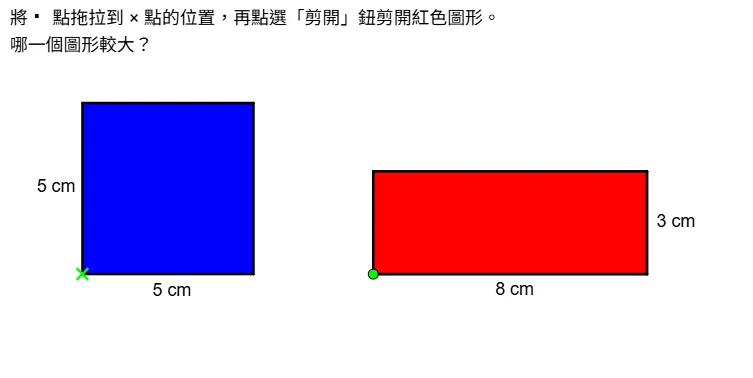
This GeoGebra applet demonstrates how to compare the areas of different figures by cutting and pasting polygons. Using commands like Polygon and Midpoint, it visually presents the step-by-step process of area-preserving transformations through interactive stages. This tool is ideal for teaching geometry, helping students understand area conservation and figure reassembly.
In collections
Grade 4 Math: Area Part 1 (Teacher's Edition)
Grade 4 Math: Area Part 1 (Student Edition)
Loading the GeoGebra board and drawing, please wait…
<?xml version="1.0" encoding="utf-8"?>
<geogebra format="5.0" version="5.2.898.1" app="classic" platform="w" id="d740503a-a848-4508-a59b-7f2248059f06" xsi:noNamespaceSchemaLocation="http://www.geogebra.org/apps/xsd/ggb.xsd" xmlns="" xmlns:xsi="http://www.w3.org/2001/XMLSchema-instance" >
<gui>
<window width="764" height="385" />
<perspectives>
<perspective id="tmp">
<panes>
<pane location="" divider="0.4" orientation="1" />
</panes>
<views>
<view id="1" visible="true" inframe="false" stylebar="false" location="1" size="500" window="100,100,600,400" />
<view id="2" visible="false" inframe="false" stylebar="false" location="3" size="200" tab="ALGEBRA" window="100,100,250,400" />
<view id="4" visible="false" inframe="false" stylebar="false" location="1,1" size="300" window="100,100,600,400" />
<view id="8" visible="false" inframe="false" stylebar="false" location="1,3" size="300" window="100,100,600,400" />
<view id="4097" visible="false" inframe="false" stylebar="true" location="1,1,1,1" size="400" window="100,100,700,550" />
<view id="512" visible="false" inframe="false" stylebar="false" location="1,1,1" size="500" window="100,100,600,400" />
</views>
<toolbar show="false" items="0 39 59 || 1 501 67 , 5 19 , 72 | 2 15 45 , 18 65 , 7 37 | 4 3 8 9 , 13 44 , 58 , 47 || 16 51 64 , 70 | 10 34 53 11 , 24 20 22 , 21 23 | 55 56 57 , 12 || 36 46 , 38 49 50 , 71 | 30 29 54 32 31 33 | 17 26 62 , 14 66 68 | 25 52 60 61 || 40 41 42 , 27 28 35 , 6" position="1" help="false" />
<input show="false" cmd="true" top="false" />
<dockBar show="false" east="false" />
</perspective>
</perspectives>
<labelingStyle val="2"/>
<font size="18"/>
</gui>
<euclidianView>
<viewNumber viewNo="1"/>
<size width="761" height="382"/>
<coordSystem xZero="117.80175439477787" yZero="138.55976030026912" scale="34.54882571075403" yscale="34.548825710754"/>
<evSettings axes="false" grid="false" gridIsBold="false" pointCapturing="2" rightAngleStyle="1" checkboxSize="26" gridType="0"/>
<bgColor r="255" g="255" b="255"/>
<axesColor r="64" g="64" b="64"/>
<gridColor r="192" g="192" b="192"/>
<lineStyle axes="1" grid="10"/>
<axis id="0" show="false" label="" unitLabel="" tickStyle="1" showNumbers="true"/>
<axis id="1" show="false" label="" unitLabel="" tickStyle="1" showNumbers="true"/>
<grid distX="0.1" distY="0.1" distTheta="0.5235987755982988"/>
</euclidianView>
<kernel>
<continuous val="false"/>
<usePathAndRegionParameters val="true"/>
<decimals val="2"/>
<angleUnit val="degree"/>
<algebraStyle val="0" spreadsheet="0"/>
<coordStyle val="0"/>
</kernel>
<tableview min="0" max="0" step="0"/>
<scripting blocked="false" disabled="false"/>
<construction title="" author="教育局 評估及考評局組" date="">
<element type="point" label="A">
<show object="true" label="false"/>
<condition showObject="¬剪開第一次"/>
<objColor r="0" g="255" b="0" alpha="0"/>
<layer val="1"/>
<labelMode val="0"/>
<fixed val="true"/>
<pointSize val="5"/>
<pointStyle val="1"/>
<coords x="-1" y="-4" z="1"/>
</element>
<element type="point" label="B">
<show object="true" label="false"/>
<condition showObject="¬剪開第一次"/>
<objColor r="0" g="255" b="0" alpha="0"/>
<layer val="1"/>
<labelMode val="0"/>
<animation step="0.1" speed="1" type="0" playing="false"/>
<pointSize val="5"/>
<pointStyle val="0"/>
<coords x="7.5" y="-4" z="1"/>
</element>
<command name="Polygon">
<input a0="A" a1="(x(A) + 5, y(A))" a2="(x(A) + 5, y(A) + 3)" a3="(x(A), y(A) + 3)"/>
<output a0="poly3" a1="a_1" a2="h" a3="i" a4="j"/>
</command>
<element type="polygon" label="poly3">
<lineStyle thickness="5" type="0" typeHidden="1"/>
<show object="true" label="false"/>
<condition showObject="剪開第一次 ∧ (¬返回原位)"/>
<objColor r="255" g="0" b="0" alpha="1"/>
<layer val="1"/>
<labelMode val="0"/>
</element>
<element type="segment" label="a_1">
<show object="true" label="false"/>
<condition showObject="剪開第一次 ∧ (¬返回原位)"/>
<objColor r="0" g="0" b="0" alpha="0"/>
<layer val="1"/>
<labelMode val="0"/>
<selectionAllowed val="false"/>
<auxiliary val="false"/>
<lineStyle thickness="5" type="0" typeHidden="1"/>
<eqnStyle style="implicit"/>
<outlyingIntersections val="false"/>
<keepTypeOnTransform val="true"/>
<startStyle val="default"/>
<endStyle val="default"/>
<coords x="0" y="5" z="20"/>
</element>
<element type="segment" label="h">
<show object="true" label="false"/>
<condition showObject="剪開第一次 ∧ (¬返回原位)"/>
<objColor r="0" g="0" b="0" alpha="0"/>
<layer val="1"/>
<labelMode val="0"/>
<selectionAllowed val="false"/>
<auxiliary val="false"/>
<lineStyle thickness="5" type="0" typeHidden="1"/>
<eqnStyle style="implicit"/>
<outlyingIntersections val="false"/>
<keepTypeOnTransform val="true"/>
<startStyle val="default"/>
<endStyle val="default"/>
<coords x="-3" y="0" z="12"/>
</element>
<element type="segment" label="i">
<show object="true" label="false"/>
<condition showObject="剪開第一次 ∧ (¬返回原位)"/>
<objColor r="0" g="0" b="0" alpha="0.1"/>
<layer val="1"/>
<labelMode val="0"/>
<selectionAllowed val="false"/>
<auxiliary val="false"/>
<lineStyle thickness="5" type="0" typeHidden="1"/>
<eqnStyle style="implicit"/>
<outlyingIntersections val="false"/>
<keepTypeOnTransform val="true"/>
<startStyle val="default"/>
<endStyle val="default"/>
<coords x="0" y="-5" z="-5"/>
</element>
<element type="segment" label="j">
<show object="true" label="false"/>
<condition showObject="剪開第一次 ∧ (¬返回原位)"/>
<objColor r="0" g="0" b="0" alpha="0"/>
<layer val="1"/>
<labelMode val="0"/>
<selectionAllowed val="false"/>
<auxiliary val="false"/>
<lineStyle thickness="5" type="0" typeHidden="1"/>
<eqnStyle style="implicit"/>
<outlyingIntersections val="false"/>
<keepTypeOnTransform val="true"/>
<startStyle val="default"/>
<endStyle val="default"/>
<coords x="3" y="0" z="3"/>
</element>
<element type="boolean" label="剪開第一次">
<value val="false"/>
<show object="true" label="true"/>
<condition showObject="A ≟ B ∧ C ≟ A + (5, 0)"/>
<objColor r="255" g="0" b="0" alpha="0"/>
<layer val="0"/>
<labelOffset x="400" y="77"/>
<labelMode val="0"/>
<checkbox fixed="true"/>
<caption val="剪開"/>
</element>
<element type="point" label="C">
<show object="true" label="false"/>
<condition showObject="剪開第一次 ∧ (¬剪開第二次)"/>
<objColor r="0" g="255" b="0" alpha="0"/>
<layer val="2"/>
<labelMode val="0"/>
<animation step="0.1" speed="1" type="0" playing="false"/>
<pointSize val="5"/>
<pointStyle val="0"/>
<coords x="4" y="-4" z="1"/>
</element>
<command name="Polygon">
<input a0="C" a1="(x(C) + 3, y(C))" a2="(x(C) + 3, y(C) + 3)" a3="(x(C), y(C) + 3)"/>
<output a0="poly4" a1="c_1" a2="k" a3="l" a4="m"/>
</command>
<element type="polygon" label="poly4">
<lineStyle thickness="5" type="0" typeHidden="1"/>
<show object="true" label="false"/>
<condition showObject="剪開第一次 ∧ (¬剪開第二次)"/>
<objColor r="255" g="0" b="0" alpha="1"/>
<layer val="2"/>
<labelMode val="0"/>
</element>
<element type="segment" label="c_1">
<show object="true" label="false"/>
<condition showObject="剪開第一次 ∧ (¬剪開第二次)"/>
<objColor r="0" g="0" b="0" alpha="0"/>
<layer val="2"/>
<labelMode val="0"/>
<selectionAllowed val="false"/>
<auxiliary val="false"/>
<lineStyle thickness="5" type="0" typeHidden="1"/>
<eqnStyle style="implicit"/>
<outlyingIntersections val="false"/>
<keepTypeOnTransform val="true"/>
<startStyle val="default"/>
<endStyle val="default"/>
<coords x="0" y="3" z="12"/>
</element>
<element type="segment" label="k">
<show object="true" label="false"/>
<condition showObject="剪開第一次 ∧ (¬剪開第二次)"/>
<objColor r="0" g="0" b="0" alpha="0"/>
<layer val="2"/>
<labelMode val="0"/>
<selectionAllowed val="false"/>
<auxiliary val="false"/>
<lineStyle thickness="5" type="0" typeHidden="1"/>
<eqnStyle style="implicit"/>
<outlyingIntersections val="false"/>
<keepTypeOnTransform val="true"/>
<startStyle val="default"/>
<endStyle val="default"/>
<coords x="-3" y="0" z="21"/>
</element>
<element type="segment" label="l">
<show object="false" label="false"/>
<condition showObject="剪開第一次 ∧ (¬剪開第二次)"/>
<objColor r="0" g="0" b="0" alpha="0"/>
<layer val="2"/>
<labelMode val="0"/>
<selectionAllowed val="false"/>
<auxiliary val="false"/>
<lineStyle thickness="5" type="0" typeHidden="1"/>
<eqnStyle style="implicit"/>
<outlyingIntersections val="false"/>
<keepTypeOnTransform val="true"/>
<startStyle val="default"/>
<endStyle val="default"/>
<coords x="0" y="-3" z="-3"/>
</element>
<element type="segment" label="m">
<show object="true" label="false"/>
<condition showObject="剪開第一次 ∧ (¬剪開第二次)"/>
<objColor r="0" g="0" b="0" alpha="0"/>
<layer val="2"/>
<labelMode val="0"/>
<selectionAllowed val="false"/>
<auxiliary val="false"/>
<lineStyle thickness="5" type="0" typeHidden="1"/>
<eqnStyle style="implicit"/>
<outlyingIntersections val="false"/>
<keepTypeOnTransform val="true"/>
<startStyle val="default"/>
<endStyle val="default"/>
<coords x="3" y="0" z="-12"/>
</element>
<element type="boolean" label="剪開第二次">
<value val="false"/>
<show object="true" label="true"/>
<condition showObject="剪開第一次 ∧ x(C) ≟ x(A) ∧ y(C) ≟ y(A) + 3 ∧ D ≟ A + (0, 5)"/>
<objColor r="255" g="0" b="0" alpha="0"/>
<layer val="0"/>
<labelOffset x="400" y="81"/>
<labelMode val="0"/>
<checkbox fixed="true"/>
<caption val="剪開"/>
</element>
<element type="boolean" label="剪開第三次">
<value val="false"/>
<show object="true" label="true"/>
<condition showObject="剪開第一次 ∧ 剪開第二次 ∧ x(D) ≟ x(A) + 3 ∧ y(D) ≟ y(A) + 3 ∧ E ≟ A + (5, 3)"/>
<objColor r="255" g="0" b="0" alpha="0"/>
<layer val="0"/>
<labelOffset x="400" y="81"/>
<labelMode val="0"/>
<checkbox fixed="true"/>
<caption val="剪開"/>
</element>
<command name="Polygon">
<input a0="(x(A), y(A) + 3)" a1="(x(A) + 3, y(A) + 3)" a2="(x(A) + 3, y(A) + 5)" a3="(x(A), y(A) + 5)"/>
<output a0="poly5" a1="n" a2="p" a3="q" a4="r"/>
</command>
<element type="polygon" label="poly5">
<lineStyle thickness="5" type="0" typeHidden="1"/>
<show object="true" label="false"/>
<condition showObject="剪開第一次 ∧ 剪開第二次 ∧ (¬返回原位)"/>
<objColor r="255" g="0" b="0" alpha="1"/>
<layer val="1"/>
<labelMode val="0"/>
</element>
<element type="segment" label="n">
<show object="true" label="false"/>
<condition showObject="剪開第一次 ∧ 剪開第二次 ∧ (¬返回原位)"/>
<objColor r="0" g="0" b="0" alpha="0"/>
<layer val="1"/>
<labelMode val="0"/>
<selectionAllowed val="false"/>
<auxiliary val="false"/>
<lineStyle thickness="5" type="0" typeHidden="1"/>
<eqnStyle style="implicit"/>
<outlyingIntersections val="false"/>
<keepTypeOnTransform val="true"/>
<startStyle val="default"/>
<endStyle val="default"/>
<coords x="0" y="3" z="3"/>
</element>
<element type="segment" label="p">
<show object="true" label="false"/>
<condition showObject="剪開第一次 ∧ 剪開第二次 ∧ (¬返回原位)"/>
<objColor r="0" g="0" b="0" alpha="0"/>
<layer val="1"/>
<labelMode val="0"/>
<selectionAllowed val="false"/>
<auxiliary val="false"/>
<lineStyle thickness="5" type="0" typeHidden="1"/>
<eqnStyle style="implicit"/>
<outlyingIntersections val="false"/>
<keepTypeOnTransform val="true"/>
<startStyle val="default"/>
<endStyle val="default"/>
<coords x="-2" y="0" z="4"/>
</element>
<element type="segment" label="q">
<show object="true" label="false"/>
<condition showObject="剪開第一次 ∧ 剪開第二次 ∧ (¬返回原位)"/>
<objColor r="0" g="0" b="0" alpha="0"/>
<layer val="1"/>
<labelMode val="0"/>
<selectionAllowed val="false"/>
<auxiliary val="false"/>
<lineStyle thickness="5" type="0" typeHidden="1"/>
<eqnStyle style="implicit"/>
<outlyingIntersections val="false"/>
<keepTypeOnTransform val="true"/>
<startStyle val="default"/>
<endStyle val="default"/>
<coords x="0" y="-3" z="3"/>
</element>
<element type="segment" label="r">
<show object="true" label="false"/>
<condition showObject="剪開第一次 ∧ 剪開第二次 ∧ (¬返回原位)"/>
<objColor r="0" g="0" b="0" alpha="0"/>
<layer val="1"/>
<labelMode val="0"/>
<selectionAllowed val="false"/>
<auxiliary val="false"/>
<lineStyle thickness="5" type="0" typeHidden="1"/>
<eqnStyle style="implicit"/>
<outlyingIntersections val="false"/>
<keepTypeOnTransform val="true"/>
<startStyle val="default"/>
<endStyle val="default"/>
<coords x="2" y="0" z="2"/>
</element>
<element type="point" label="D">
<show object="true" label="false"/>
<condition showObject="剪開第一次 ∧ 剪開第二次 ∧ (¬剪開第三次)"/>
<objColor r="0" g="255" b="0" alpha="0"/>
<layer val="3"/>
<labelMode val="0"/>
<animation step="0.1" speed="1" type="0" playing="false"/>
<pointSize val="5"/>
<pointStyle val="0"/>
<coords x="-1" y="1" z="1"/>
</element>
<command name="Polygon">
<input a0="D" a1="(x(D) + 3, y(D))" a2="(x(D) + 3, y(D) + 1)" a3="(x(D), y(D) + 1)"/>
<output a0="poly6" a1="d_1" a2="s" a3="t" a4="e_1"/>
</command>
<element type="polygon" label="poly6">
<lineStyle thickness="5" type="0" typeHidden="1"/>
<show object="true" label="false"/>
<condition showObject="剪開第一次 ∧ 剪開第二次 ∧ (¬剪開第三次)"/>
<objColor r="255" g="0" b="0" alpha="1"/>
<layer val="3"/>
<labelMode val="0"/>
</element>
<element type="segment" label="d_1">
<show object="true" label="false"/>
<condition showObject="剪開第一次 ∧ 剪開第二次 ∧ (¬剪開第三次)"/>
<objColor r="0" g="0" b="0" alpha="0"/>
<layer val="3"/>
<labelMode val="0"/>
<selectionAllowed val="false"/>
<auxiliary val="false"/>
<lineStyle thickness="5" type="0" typeHidden="1"/>
<eqnStyle style="implicit"/>
<outlyingIntersections val="false"/>
<keepTypeOnTransform val="true"/>
<startStyle val="default"/>
<endStyle val="default"/>
<coords x="0" y="3" z="-3"/>
</element>
<element type="segment" label="s">
<show object="true" label="false"/>
<condition showObject="剪開第一次 ∧ 剪開第二次 ∧ (¬剪開第三次)"/>
<objColor r="0" g="0" b="0" alpha="0"/>
<layer val="3"/>
<labelMode val="0"/>
<selectionAllowed val="false"/>
<auxiliary val="false"/>
<lineStyle thickness="5" type="0" typeHidden="1"/>
<eqnStyle style="implicit"/>
<outlyingIntersections val="false"/>
<keepTypeOnTransform val="true"/>
<startStyle val="default"/>
<endStyle val="default"/>
<coords x="-1" y="0" z="2"/>
</element>
<element type="segment" label="t">
<show object="true" label="false"/>
<condition showObject="剪開第一次 ∧ 剪開第二次 ∧ (¬剪開第三次)"/>
<objColor r="0" g="0" b="0" alpha="0"/>
<layer val="3"/>
<labelMode val="0"/>
<selectionAllowed val="false"/>
<auxiliary val="false"/>
<lineStyle thickness="5" type="0" typeHidden="1"/>
<eqnStyle style="implicit"/>
<outlyingIntersections val="false"/>
<keepTypeOnTransform val="true"/>
<startStyle val="default"/>
<endStyle val="default"/>
<coords x="0" y="-3" z="6"/>
</element>
<element type="segment" label="e_1">
<show object="true" label="false"/>
<condition showObject="剪開第一次 ∧ 剪開第二次 ∧ (¬剪開第三次)"/>
<objColor r="0" g="0" b="0" alpha="0"/>
<layer val="3"/>
<labelMode val="0"/>
<selectionAllowed val="false"/>
<auxiliary val="false"/>
<lineStyle thickness="5" type="0" typeHidden="1"/>
<eqnStyle style="implicit"/>
<outlyingIntersections val="false"/>
<keepTypeOnTransform val="true"/>
<startStyle val="default"/>
<endStyle val="default"/>
<coords x="1" y="0" z="1"/>
</element>
<command name="Polygon">
<input a0="(x(A) + 3, y(A) + 3)" a1="(x(A) + 5, y(A) + 3)" a2="(x(A) + 5, y(A) + 4)" a3="(x(A) + 3, y(A) + 4)"/>
<output a0="poly7" a1="f_1" a2="g_1" a3="h_1" a4="i_1"/>
</command>
<element type="polygon" label="poly7">
<lineStyle thickness="5" type="0" typeHidden="1"/>
<show object="true" label="false"/>
<condition showObject="剪開第一次 ∧ 剪開第二次 ∧ 剪開第三次 ∧ (¬返回原位)"/>
<objColor r="255" g="0" b="0" alpha="1"/>
<layer val="1"/>
<labelMode val="0"/>
</element>
<element type="segment" label="f_1">
<show object="true" label="false"/>
<condition showObject="剪開第一次 ∧ 剪開第二次 ∧ 剪開第三次 ∧ (¬返回原位)"/>
<objColor r="0" g="0" b="0" alpha="0"/>
<layer val="1"/>
<labelMode val="0"/>
<selectionAllowed val="false"/>
<auxiliary val="false"/>
<lineStyle thickness="5" type="0" typeHidden="1"/>
<eqnStyle style="implicit"/>
<outlyingIntersections val="false"/>
<keepTypeOnTransform val="true"/>
<startStyle val="default"/>
<endStyle val="default"/>
<coords x="0" y="2" z="2"/>
</element>
<element type="segment" label="g_1">
<show object="true" label="false"/>
<condition showObject="剪開第一次 ∧ 剪開第二次 ∧ 剪開第三次 ∧ (¬返回原位)"/>
<objColor r="0" g="0" b="0" alpha="0"/>
<layer val="1"/>
<labelMode val="0"/>
<selectionAllowed val="false"/>
<auxiliary val="false"/>
<lineStyle thickness="5" type="0" typeHidden="1"/>
<eqnStyle style="implicit"/>
<outlyingIntersections val="false"/>
<keepTypeOnTransform val="true"/>
<startStyle val="default"/>
<endStyle val="default"/>
<coords x="-1" y="0" z="4"/>
</element>
<element type="segment" label="h_1">
<show object="true" label="false"/>
<condition showObject="剪開第一次 ∧ 剪開第二次 ∧ 剪開第三次 ∧ (¬返回原位)"/>
<objColor r="0" g="0" b="0" alpha="0"/>
<layer val="1"/>
<labelMode val="0"/>
<selectionAllowed val="false"/>
<auxiliary val="false"/>
<lineStyle thickness="5" type="0" typeHidden="1"/>
<eqnStyle style="implicit"/>
<outlyingIntersections val="false"/>
<keepTypeOnTransform val="true"/>
<startStyle val="default"/>
<endStyle val="default"/>
<coords x="0" y="-2" z="0"/>
</element>
<element type="segment" label="i_1">
<show object="true" label="false"/>
<condition showObject="剪開第一次 ∧ 剪開第二次 ∧ 剪開第三次 ∧ (¬返回原位)"/>
<objColor r="0" g="0" b="0" alpha="0"/>
<layer val="1"/>
<labelMode val="0"/>
<selectionAllowed val="false"/>
<auxiliary val="false"/>
<lineStyle thickness="5" type="0" typeHidden="1"/>
<eqnStyle style="implicit"/>
<outlyingIntersections val="false"/>
<keepTypeOnTransform val="true"/>
<startStyle val="default"/>
<endStyle val="default"/>
<coords x="1" y="0" z="-2"/>
</element>
<element type="point" label="E">
<show object="true" label="false"/>
<condition showObject="剪開第一次 ∧ 剪開第二次 ∧ 剪開第三次 ∧ (¬返回原位)"/>
<objColor r="0" g="255" b="0" alpha="0"/>
<layer val="4"/>
<labelMode val="0"/>
<animation step="0.1" speed="1" type="0" playing="false"/>
<pointSize val="5"/>
<pointStyle val="0"/>
<coords x="4" y="-1" z="1"/>
</element>
<command name="Polygon">
<input a0="E" a1="(x(E) + 1, y(E))" a2="(x(E) + 1, y(E) + 1)" a3="(x(E), y(E) + 1)"/>
<output a0="poly8" a1="e_2" a2="j_1" a3="k_1" a4="l_1"/>
</command>
<element type="polygon" label="poly8">
<lineStyle thickness="5" type="0" typeHidden="1"/>
<show object="true" label="false"/>
<condition showObject="剪開第一次 ∧ 剪開第二次 ∧ 剪開第三次 ∧ (¬返回原位)"/>
<objColor r="255" g="0" b="0" alpha="1"/>
<layer val="4"/>
<labelMode val="0"/>
</element>
<element type="segment" label="e_2">
<show object="true" label="false"/>
<condition showObject="剪開第一次 ∧ 剪開第二次 ∧ 剪開第三次 ∧ (¬返回原位)"/>
<objColor r="0" g="0" b="0" alpha="0"/>
<layer val="4"/>
<labelMode val="0"/>
<selectionAllowed val="false"/>
<auxiliary val="false"/>
<lineStyle thickness="5" type="0" typeHidden="1"/>
<eqnStyle style="implicit"/>
<outlyingIntersections val="false"/>
<keepTypeOnTransform val="true"/>
<startStyle val="default"/>
<endStyle val="default"/>
<coords x="0" y="1" z="1"/>
</element>
<element type="segment" label="j_1">
<show object="true" label="false"/>
<condition showObject="剪開第一次 ∧ 剪開第二次 ∧ 剪開第三次 ∧ (¬返回原位)"/>
<objColor r="0" g="0" b="0" alpha="0"/>
<layer val="4"/>
<labelMode val="0"/>
<selectionAllowed val="false"/>
<auxiliary val="false"/>
<lineStyle thickness="5" type="0" typeHidden="1"/>
<eqnStyle style="implicit"/>
<outlyingIntersections val="false"/>
<keepTypeOnTransform val="true"/>
<startStyle val="default"/>
<endStyle val="default"/>
<coords x="-1" y="0" z="5"/>
</element>
<element type="segment" label="k_1">
<show object="true" label="false"/>
<condition showObject="剪開第一次 ∧ 剪開第二次 ∧ 剪開第三次 ∧ (¬返回原位)"/>
<objColor r="0" g="0" b="0" alpha="0"/>
<layer val="4"/>
<labelMode val="0"/>
<selectionAllowed val="false"/>
<auxiliary val="false"/>
<lineStyle thickness="5" type="0" typeHidden="1"/>
<eqnStyle style="implicit"/>
<outlyingIntersections val="false"/>
<keepTypeOnTransform val="true"/>
<startStyle val="default"/>
<endStyle val="default"/>
<coords x="0" y="-1" z="0"/>
</element>
<element type="segment" label="l_1">
<show object="true" label="false"/>
<condition showObject="剪開第一次 ∧ 剪開第二次 ∧ 剪開第三次 ∧ (¬返回原位)"/>
<objColor r="0" g="0" b="0" alpha="0"/>
<layer val="4"/>
<labelMode val="0"/>
<selectionAllowed val="false"/>
<auxiliary val="false"/>
<lineStyle thickness="5" type="0" typeHidden="1"/>
<eqnStyle style="implicit"/>
<outlyingIntersections val="false"/>
<keepTypeOnTransform val="true"/>
<startStyle val="default"/>
<endStyle val="default"/>
<coords x="1" y="0" z="-4"/>
</element>
<command name="Polygon">
<input a0="A" a1="(x(A) + 5, y(A))" a2="(x(A) + 5, y(A) + 5)" a3="(x(A), y(A) + 5)"/>
<output a0="poly1" a1="a" a2="b" a3="c" a4="d"/>
</command>
<element type="polygon" label="poly1">
<lineStyle thickness="5" type="0" typeHidden="1"/>
<show object="true" label="false"/>
<objColor r="0" g="0" b="255" alpha="1"/>
<layer val="0"/>
<labelMode val="0"/>
<fixed val="true"/>
</element>
<element type="segment" label="a">
<show object="true" label="false"/>
<objColor r="0" g="0" b="0" alpha="0"/>
<layer val="0"/>
<labelMode val="0"/>
<selectionAllowed val="false"/>
<auxiliary val="false"/>
<lineStyle thickness="5" type="0" typeHidden="1"/>
<eqnStyle style="implicit"/>
<outlyingIntersections val="false"/>
<keepTypeOnTransform val="true"/>
<startStyle val="default"/>
<endStyle val="default"/>
<coords x="0" y="5" z="20"/>
</element>
<element type="segment" label="b">
<show object="true" label="false"/>
<objColor r="0" g="0" b="0" alpha="0"/>
<layer val="0"/>
<labelMode val="0"/>
<selectionAllowed val="false"/>
<auxiliary val="false"/>
<lineStyle thickness="5" type="0" typeHidden="1"/>
<eqnStyle style="implicit"/>
<outlyingIntersections val="false"/>
<keepTypeOnTransform val="true"/>
<startStyle val="default"/>
<endStyle val="default"/>
<coords x="-5" y="0" z="20"/>
</element>
<element type="segment" label="c">
<show object="true" label="false"/>
<objColor r="0" g="0" b="0" alpha="0"/>
<layer val="0"/>
<labelMode val="0"/>
<selectionAllowed val="false"/>
<auxiliary val="false"/>
<lineStyle thickness="5" type="0" typeHidden="1"/>
<eqnStyle style="implicit"/>
<outlyingIntersections val="false"/>
<keepTypeOnTransform val="true"/>
<startStyle val="default"/>
<endStyle val="default"/>
<coords x="0" y="-5" z="5"/>
</element>
<element type="segment" label="d">
<show object="true" label="false"/>
<objColor r="0" g="0" b="0" alpha="0"/>
<layer val="0"/>
<labelMode val="0"/>
<selectionAllowed val="false"/>
<auxiliary val="false"/>
<lineStyle thickness="5" type="0" typeHidden="1"/>
<eqnStyle style="implicit"/>
<outlyingIntersections val="false"/>
<keepTypeOnTransform val="true"/>
<startStyle val="default"/>
<endStyle val="default"/>
<coords x="5" y="0" z="5"/>
</element>
<command name="Polygon">
<input a0="B" a1="(x(B) + 8, y(B))" a2="(x(B) + 8, y(B) + 3)" a3="(x(B), y(B) + 3)"/>
<output a0="poly2" a1="b_1" a2="e" a3="f" a4="g"/>
</command>
<element type="polygon" label="poly2">
<lineStyle thickness="5" type="0" typeHidden="1"/>
<show object="true" label="false"/>
<condition showObject="¬剪開第一次"/>
<objColor r="255" g="0" b="0" alpha="1"/>
<layer val="1"/>
<labelMode val="0"/>
</element>
<element type="segment" label="b_1">
<show object="true" label="false"/>
<condition showObject="¬剪開第一次"/>
<objColor r="0" g="0" b="0" alpha="0"/>
<layer val="1"/>
<labelMode val="0"/>
<selectionAllowed val="false"/>
<auxiliary val="false"/>
<lineStyle thickness="5" type="0" typeHidden="1"/>
<eqnStyle style="implicit"/>
<outlyingIntersections val="false"/>
<keepTypeOnTransform val="true"/>
<startStyle val="default"/>
<endStyle val="default"/>
<coords x="0" y="8" z="32"/>
</element>
<element type="segment" label="e">
<show object="true" label="false"/>
<condition showObject="¬剪開第一次"/>
<objColor r="0" g="0" b="0" alpha="0"/>
<layer val="1"/>
<labelMode val="0"/>
<selectionAllowed val="false"/>
<auxiliary val="false"/>
<lineStyle thickness="5" type="0" typeHidden="1"/>
<eqnStyle style="implicit"/>
<outlyingIntersections val="false"/>
<keepTypeOnTransform val="true"/>
<startStyle val="default"/>
<endStyle val="default"/>
<coords x="-3" y="0" z="46.5"/>
</element>
<element type="segment" label="f">
<show object="true" label="false"/>
<condition showObject="¬剪開第一次"/>
<objColor r="0" g="0" b="0" alpha="0"/>
<layer val="1"/>
<labelMode val="0"/>
<selectionAllowed val="false"/>
<auxiliary val="false"/>
<lineStyle thickness="5" type="0" typeHidden="1"/>
<eqnStyle style="implicit"/>
<outlyingIntersections val="false"/>
<keepTypeOnTransform val="true"/>
<startStyle val="default"/>
<endStyle val="default"/>
<coords x="0" y="-8" z="-8"/>
</element>
<element type="segment" label="g">
<show object="true" label="false"/>
<condition showObject="¬剪開第一次"/>
<objColor r="0" g="0" b="0" alpha="0"/>
<layer val="1"/>
<labelMode val="0"/>
<selectionAllowed val="false"/>
<auxiliary val="false"/>
<lineStyle thickness="5" type="0" typeHidden="1"/>
<eqnStyle style="implicit"/>
<outlyingIntersections val="false"/>
<keepTypeOnTransform val="true"/>
<startStyle val="default"/>
<endStyle val="default"/>
<coords x="3" y="0" z="-22.5"/>
</element>
<expression label="F" exp="(x(A), y(A) + 3)" type="point" />
<element type="point" label="F">
<show object="true" label="false"/>
<condition showObject="剪開第一次 ∧ (¬剪開第二次)"/>
<objColor r="0" g="255" b="0" alpha="0"/>
<layer val="2"/>
<labelMode val="0"/>
<pointSize val="5"/>
<pointStyle val="1"/>
<coords x="-1" y="-1" z="1"/>
</element>
<expression label="G" exp="(x(A) + 3, y(A) + 3)" type="point" />
<element type="point" label="G">
<show object="true" label="false"/>
<condition showObject="剪開第一次 ∧ 剪開第二次 ∧ (¬剪開第三次)"/>
<objColor r="0" g="255" b="0" alpha="0"/>
<layer val="3"/>
<labelMode val="0"/>
<pointSize val="5"/>
<pointStyle val="1"/>
<coords x="2" y="-1" z="1"/>
</element>
<expression label="H" exp="(x(A) + 3, y(A) + 4)" type="point" />
<element type="point" label="H">
<show object="true" label="false"/>
<condition showObject="剪開第一次 ∧ 剪開第二次 ∧ 剪開第三次 ∧ (¬返回原位)"/>
<objColor r="0" g="255" b="0" alpha="0"/>
<layer val="4"/>
<labelMode val="0"/>
<pointSize val="5"/>
<pointStyle val="1"/>
<coords x="2" y="0" z="1"/>
</element>
<command name="Polygon">
<input a0="(7.5, -4)" a1="(15.5, -4)" a2="(15.5, -1)" a3="(7.5, -1)"/>
<output a0="poly9" a1="m_1" a2="n_1" a3="p_1" a4="q_1"/>
</command>
<element type="polygon" label="poly9">
<lineStyle thickness="5" type="0" typeHidden="1"/>
<show object="false" label="false"/>
<objColor r="0" g="0" b="0" alpha="0"/>
<layer val="1"/>
<labelMode val="0"/>
</element>
<element type="segment" label="m_1">
<show object="true" label="false"/>
<objColor r="0" g="0" b="0" alpha="0"/>
<layer val="0"/>
<labelMode val="0"/>
<selectionAllowed val="false"/>
<auxiliary val="false"/>
<lineStyle thickness="5" type="0" typeHidden="1"/>
<eqnStyle style="implicit"/>
<outlyingIntersections val="false"/>
<keepTypeOnTransform val="true"/>
<startStyle val="default"/>
<endStyle val="default"/>
<coords x="0" y="8" z="32"/>
</element>
<element type="segment" label="n_1">
<show object="true" label="false"/>
<objColor r="0" g="0" b="0" alpha="0"/>
<layer val="0"/>
<labelMode val="0"/>
<selectionAllowed val="false"/>
<auxiliary val="false"/>
<lineStyle thickness="5" type="0" typeHidden="1"/>
<eqnStyle style="implicit"/>
<outlyingIntersections val="false"/>
<keepTypeOnTransform val="true"/>
<startStyle val="default"/>
<endStyle val="default"/>
<coords x="-3" y="0" z="46.5"/>
</element>
<element type="segment" label="p_1">
<show object="true" label="false"/>
<objColor r="0" g="0" b="0" alpha="0"/>
<layer val="0"/>
<labelMode val="0"/>
<selectionAllowed val="false"/>
<auxiliary val="false"/>
<lineStyle thickness="5" type="0" typeHidden="1"/>
<eqnStyle style="implicit"/>
<outlyingIntersections val="false"/>
<keepTypeOnTransform val="true"/>
<startStyle val="default"/>
<endStyle val="default"/>
<coords x="0" y="-8" z="-8"/>
</element>
<element type="segment" label="q_1">
<show object="true" label="false"/>
<objColor r="0" g="0" b="0" alpha="0"/>
<layer val="0"/>
<labelMode val="0"/>
<selectionAllowed val="false"/>
<auxiliary val="false"/>
<lineStyle thickness="5" type="0" typeHidden="1"/>
<eqnStyle style="implicit"/>
<outlyingIntersections val="false"/>
<keepTypeOnTransform val="true"/>
<startStyle val="default"/>
<endStyle val="default"/>
<coords x="3" y="0" z="-22.5"/>
</element>
<command name="If">
<input a0="E ≟ H" a1="true" a2="false"/>
<output a0="返回原位"/>
</command>
<element type="boolean" label="返回原位">
<value val="false"/>
<show object="true" label="true"/>
<condition showObject="剪開第一次 ∧ 剪開第二次 ∧ 剪開第三次 ∧ x(E) ≟ x(A) + 3 ∧ y(E) ≟ y(A) + 4"/>
<objColor r="255" g="0" b="0" alpha="0"/>
<layer val="4"/>
<labelMode val="0"/>
<checkbox fixed="true"/>
</element>
<element type="numeric" label="u">
<value val="0"/>
<slider min="0" max="1" absoluteScreenLocation="true" width="100" x="398" y="82" fixed="false" horizontal="true" showAlgebra="false"/>
<lineStyle thickness="5" type="0" typeHidden="1"/>
<show object="true" label="true"/>
<condition showObject="剪開第一次 ∧ 剪開第二次 ∧ 剪開第三次 ∧ 返回原位"/>
<objColor r="255" g="0" b="0" alpha="0.1"/>
<layer val="0"/>
<labelMode val="3"/>
<animation step="0.01" speed="1" type="0" playing="false"/>
<caption val="返回原位"/>
</element>
<expression label="A1" exp="(-1 + ((7.5 + 1) * u), (-1 * 4))" type="point" />
<element type="point" label="A1">
<show object="false" label="true"/>
<objColor r="125" g="125" b="255" alpha="0"/>
<layer val="4"/>
<labelMode val="0"/>
<pointSize val="5"/>
<pointStyle val="0"/>
<coords x="-1" y="-4" z="1"/>
</element>
<expression label="A2" exp="(-1 + (13.5 * u), -1 - (3 * u))" type="point" />
<element type="point" label="A2">
<show object="false" label="true"/>
<objColor r="125" g="125" b="255" alpha="0"/>
<layer val="4"/>
<labelMode val="0"/>
<pointSize val="5"/>
<pointStyle val="0"/>
<coords x="-1" y="-1" z="1"/>
</element>
<expression label="A3" exp="(2 + (10.5 * u), -1 - u)" type="point" />
<element type="point" label="A3">
<show object="false" label="true"/>
<objColor r="125" g="125" b="255" alpha="0"/>
<layer val="4"/>
<labelMode val="0"/>
<pointSize val="5"/>
<pointStyle val="0"/>
<coords x="2" y="-1" z="1"/>
</element>
<expression label="A4" exp="(2 + (12.5 * u), ((-1 * 2) * u))" type="point" />
<element type="point" label="A4">
<show object="false" label="true"/>
<objColor r="125" g="125" b="255" alpha="0"/>
<layer val="4"/>
<labelMode val="0"/>
<pointSize val="5"/>
<pointStyle val="0"/>
<coords x="2" y="0" z="1"/>
</element>
<command name="Polygon">
<input a0="A1" a1="(x(A1) + 5, y(A1))" a2="(x(A1) + 5, y(A1) + 3)" a3="(x(A1), y(A1) + 3)"/>
<output a0="poly10" a1="a1" a2="r_1" a3="s_1" a4="t_1"/>
</command>
<element type="polygon" label="poly10">
<lineStyle thickness="5" type="0" typeHidden="1"/>
<show object="true" label="false"/>
<condition showObject="剪開第一次 ∧ 剪開第二次 ∧ 剪開第三次 ∧ 返回原位"/>
<objColor r="255" g="0" b="0" alpha="1"/>
<layer val="1"/>
<labelMode val="0"/>
</element>
<element type="segment" label="a1">
<show object="true" label="false"/>
<condition showObject="剪開第一次 ∧ 剪開第二次 ∧ 剪開第三次 ∧ 返回原位"/>
<objColor r="0" g="0" b="0" alpha="0"/>
<layer val="1"/>
<labelMode val="0"/>
<selectionAllowed val="false"/>
<auxiliary val="false"/>
<lineStyle thickness="5" type="0" typeHidden="1"/>
<eqnStyle style="implicit"/>
<outlyingIntersections val="false"/>
<keepTypeOnTransform val="true"/>
<startStyle val="default"/>
<endStyle val="default"/>
<coords x="0" y="5" z="20"/>
</element>
<element type="segment" label="r_1">
<show object="true" label="false"/>
<condition showObject="剪開第一次 ∧ 剪開第二次 ∧ 剪開第三次 ∧ 返回原位"/>
<objColor r="0" g="0" b="0" alpha="0"/>
<layer val="1"/>
<labelMode val="0"/>
<selectionAllowed val="false"/>
<auxiliary val="false"/>
<lineStyle thickness="5" type="0" typeHidden="1"/>
<eqnStyle style="implicit"/>
<outlyingIntersections val="false"/>
<keepTypeOnTransform val="true"/>
<startStyle val="default"/>
<endStyle val="default"/>
<coords x="-3" y="0" z="12"/>
</element>
<element type="segment" label="s_1">
<show object="true" label="false"/>
<condition showObject="剪開第一次 ∧ 剪開第二次 ∧ 剪開第三次 ∧ 返回原位"/>
<objColor r="0" g="0" b="0" alpha="0"/>
<layer val="1"/>
<labelMode val="0"/>
<selectionAllowed val="false"/>
<auxiliary val="false"/>
<lineStyle thickness="5" type="0" typeHidden="1"/>
<eqnStyle style="implicit"/>
<outlyingIntersections val="false"/>
<keepTypeOnTransform val="true"/>
<startStyle val="default"/>
<endStyle val="default"/>
<coords x="0" y="-5" z="-5"/>
</element>
<element type="segment" label="t_1">
<show object="true" label="false"/>
<condition showObject="剪開第一次 ∧ 剪開第二次 ∧ 剪開第三次 ∧ 返回原位"/>
<objColor r="0" g="0" b="0" alpha="0"/>
<layer val="1"/>
<labelMode val="0"/>
<selectionAllowed val="false"/>
<auxiliary val="false"/>
<lineStyle thickness="5" type="0" typeHidden="1"/>
<eqnStyle style="implicit"/>
<outlyingIntersections val="false"/>
<keepTypeOnTransform val="true"/>
<startStyle val="default"/>
<endStyle val="default"/>
<coords x="3" y="0" z="3"/>
</element>
<command name="Polygon">
<input a0="A2" a1="(x(A2) + 3, y(A2))" a2="(x(A2) + 3, y(A2) + 2)" a3="(x(A2), y(A2) + 2)"/>
<output a0="poly11" a1="a2" a2="a_2" a3="b_2" a4="c_2"/>
</command>
<element type="polygon" label="poly11">
<lineStyle thickness="5" type="0" typeHidden="1"/>
<show object="true" label="false"/>
<condition showObject="剪開第一次 ∧ 剪開第二次 ∧ 剪開第三次 ∧ 返回原位"/>
<objColor r="255" g="0" b="0" alpha="1"/>
<layer val="2"/>
<labelMode val="0"/>
</element>
<element type="segment" label="a2">
<show object="true" label="false"/>
<condition showObject="剪開第一次 ∧ 剪開第二次 ∧ 剪開第三次 ∧ 返回原位"/>
<objColor r="0" g="0" b="0" alpha="0"/>
<layer val="2"/>
<labelMode val="0"/>
<selectionAllowed val="false"/>
<auxiliary val="false"/>
<lineStyle thickness="5" type="0" typeHidden="1"/>
<eqnStyle style="implicit"/>
<outlyingIntersections val="false"/>
<keepTypeOnTransform val="true"/>
<startStyle val="default"/>
<endStyle val="default"/>
<coords x="0" y="3" z="3"/>
</element>
<element type="segment" label="a_2">
<show object="true" label="false"/>
<condition showObject="剪開第一次 ∧ 剪開第二次 ∧ 剪開第三次 ∧ 返回原位"/>
<objColor r="0" g="0" b="0" alpha="0"/>
<layer val="2"/>
<labelMode val="0"/>
<selectionAllowed val="false"/>
<auxiliary val="false"/>
<lineStyle thickness="5" type="0" typeHidden="1"/>
<eqnStyle style="implicit"/>
<outlyingIntersections val="false"/>
<keepTypeOnTransform val="true"/>
<startStyle val="default"/>
<endStyle val="default"/>
<coords x="-2" y="0" z="4"/>
</element>
<element type="segment" label="b_2">
<show object="true" label="false"/>
<condition showObject="剪開第一次 ∧ 剪開第二次 ∧ 剪開第三次 ∧ 返回原位"/>
<objColor r="0" g="0" b="0" alpha="0"/>
<layer val="2"/>
<labelMode val="0"/>
<selectionAllowed val="false"/>
<auxiliary val="false"/>
<lineStyle thickness="5" type="0" typeHidden="1"/>
<eqnStyle style="implicit"/>
<outlyingIntersections val="false"/>
<keepTypeOnTransform val="true"/>
<startStyle val="default"/>
<endStyle val="default"/>
<coords x="0" y="-3" z="3"/>
</element>
<element type="segment" label="c_2">
<show object="true" label="false"/>
<condition showObject="剪開第一次 ∧ 剪開第二次 ∧ 剪開第三次 ∧ 返回原位"/>
<objColor r="0" g="0" b="0" alpha="0"/>
<layer val="2"/>
<labelMode val="0"/>
<selectionAllowed val="false"/>
<auxiliary val="false"/>
<lineStyle thickness="5" type="0" typeHidden="1"/>
<eqnStyle style="implicit"/>
<outlyingIntersections val="false"/>
<keepTypeOnTransform val="true"/>
<startStyle val="default"/>
<endStyle val="default"/>
<coords x="2" y="0" z="2"/>
</element>
<command name="Polygon">
<input a0="A3" a1="(x(A3) + 2, y(A3))" a2="(x(A3) + 2, y(A3) + 1)" a3="(x(A3), y(A3) + 1)"/>
<output a0="poly12" a1="a3" a2="d_2" a3="f_2" a4="g_2"/>
</command>
<element type="polygon" label="poly12">
<lineStyle thickness="5" type="0" typeHidden="1"/>
<show object="true" label="false"/>
<condition showObject="剪開第一次 ∧ 剪開第二次 ∧ 剪開第三次 ∧ 返回原位"/>
<objColor r="255" g="0" b="0" alpha="1"/>
<layer val="3"/>
<labelMode val="0"/>
</element>
<element type="segment" label="a3">
<show object="true" label="false"/>
<condition showObject="剪開第一次 ∧ 剪開第二次 ∧ 剪開第三次 ∧ 返回原位"/>
<objColor r="0" g="0" b="0" alpha="0"/>
<layer val="3"/>
<labelMode val="0"/>
<selectionAllowed val="false"/>
<auxiliary val="false"/>
<lineStyle thickness="5" type="0" typeHidden="1"/>
<eqnStyle style="implicit"/>
<outlyingIntersections val="false"/>
<keepTypeOnTransform val="true"/>
<startStyle val="default"/>
<endStyle val="default"/>
<coords x="0" y="2" z="2"/>
</element>
<element type="segment" label="d_2">
<show object="true" label="false"/>
<condition showObject="剪開第一次 ∧ 剪開第二次 ∧ 剪開第三次 ∧ 返回原位"/>
<objColor r="0" g="0" b="0" alpha="0"/>
<layer val="3"/>
<labelMode val="0"/>
<selectionAllowed val="false"/>
<auxiliary val="false"/>
<lineStyle thickness="5" type="0" typeHidden="1"/>
<eqnStyle style="implicit"/>
<outlyingIntersections val="false"/>
<keepTypeOnTransform val="true"/>
<startStyle val="default"/>
<endStyle val="default"/>
<coords x="-1" y="0" z="4"/>
</element>
<element type="segment" label="f_2">
<show object="true" label="false"/>
<condition showObject="剪開第一次 ∧ 剪開第二次 ∧ 剪開第三次 ∧ 返回原位"/>
<objColor r="0" g="0" b="0" alpha="0"/>
<layer val="3"/>
<labelMode val="0"/>
<selectionAllowed val="false"/>
<auxiliary val="false"/>
<lineStyle thickness="5" type="0" typeHidden="1"/>
<eqnStyle style="implicit"/>
<outlyingIntersections val="false"/>
<keepTypeOnTransform val="true"/>
<startStyle val="default"/>
<endStyle val="default"/>
<coords x="0" y="-2" z="0"/>
</element>
<element type="segment" label="g_2">
<show object="true" label="false"/>
<condition showObject="剪開第一次 ∧ 剪開第二次 ∧ 剪開第三次 ∧ 返回原位"/>
<objColor r="0" g="0" b="0" alpha="0"/>
<layer val="3"/>
<labelMode val="0"/>
<selectionAllowed val="false"/>
<auxiliary val="false"/>
<lineStyle thickness="5" type="0" typeHidden="1"/>
<eqnStyle style="implicit"/>
<outlyingIntersections val="false"/>
<keepTypeOnTransform val="true"/>
<startStyle val="default"/>
<endStyle val="default"/>
<coords x="1" y="0" z="-2"/>
</element>
<command name="Polygon">
<input a0="A4" a1="(x(A4) + 1, y(A4))" a2="(x(A4) + 1, y(A4) + 1)" a3="(x(A4), y(A4) + 1)"/>
<output a0="poly13" a1="a4" a2="h_2" a3="i_2" a4="j_2"/>
</command>
<element type="polygon" label="poly13">
<lineStyle thickness="5" type="0" typeHidden="1"/>
<show object="true" label="false"/>
<condition showObject="剪開第一次 ∧ 剪開第二次 ∧ 剪開第三次 ∧ 返回原位"/>
<objColor r="255" g="0" b="0" alpha="1"/>
<layer val="4"/>
<labelMode val="0"/>
</element>
<element type="segment" label="a4">
<show object="true" label="false"/>
<condition showObject="剪開第一次 ∧ 剪開第二次 ∧ 剪開第三次 ∧ 返回原位"/>
<objColor r="0" g="0" b="0" alpha="0"/>
<layer val="4"/>
<labelMode val="0"/>
<selectionAllowed val="false"/>
<auxiliary val="false"/>
<lineStyle thickness="5" type="0" typeHidden="1"/>
<eqnStyle style="implicit"/>
<outlyingIntersections val="false"/>
<keepTypeOnTransform val="true"/>
<startStyle val="default"/>
<endStyle val="default"/>
<coords x="0" y="1" z="0"/>
</element>
<element type="segment" label="h_2">
<show object="true" label="false"/>
<condition showObject="剪開第一次 ∧ 剪開第二次 ∧ 剪開第三次 ∧ 返回原位"/>
<objColor r="0" g="0" b="0" alpha="0"/>
<layer val="4"/>
<labelMode val="0"/>
<selectionAllowed val="false"/>
<auxiliary val="false"/>
<lineStyle thickness="5" type="0" typeHidden="1"/>
<eqnStyle style="implicit"/>
<outlyingIntersections val="false"/>
<keepTypeOnTransform val="true"/>
<startStyle val="default"/>
<endStyle val="default"/>
<coords x="-1" y="0" z="3"/>
</element>
<element type="segment" label="i_2">
<show object="true" label="false"/>
<condition showObject="剪開第一次 ∧ 剪開第二次 ∧ 剪開第三次 ∧ 返回原位"/>
<objColor r="0" g="0" b="0" alpha="0"/>
<layer val="4"/>
<labelMode val="0"/>
<selectionAllowed val="false"/>
<auxiliary val="false"/>
<lineStyle thickness="5" type="0" typeHidden="1"/>
<eqnStyle style="implicit"/>
<outlyingIntersections val="false"/>
<keepTypeOnTransform val="true"/>
<startStyle val="default"/>
<endStyle val="default"/>
<coords x="0" y="-1" z="1"/>
</element>
<element type="segment" label="j_2">
<show object="true" label="false"/>
<condition showObject="剪開第一次 ∧ 剪開第二次 ∧ 剪開第三次 ∧ 返回原位"/>
<objColor r="0" g="0" b="0" alpha="0"/>
<layer val="4"/>
<labelMode val="0"/>
<selectionAllowed val="false"/>
<auxiliary val="false"/>
<lineStyle thickness="5" type="0" typeHidden="1"/>
<eqnStyle style="implicit"/>
<outlyingIntersections val="false"/>
<keepTypeOnTransform val="true"/>
<startStyle val="default"/>
<endStyle val="default"/>
<coords x="1" y="0" z="-2"/>
</element>
<command name="Midpoint">
<input a0="a"/>
<output a0="J"/>
</command>
<element type="point" label="J">
<show object="false" label="false"/>
<objColor r="64" g="64" b="64" alpha="0"/>
<layer val="4"/>
<labelMode val="0"/>
<pointSize val="5"/>
<pointStyle val="0"/>
<coords x="1.5" y="-4" z="1"/>
</element>
<command name="Midpoint">
<input a0="m_1"/>
<output a0="K"/>
</command>
<element type="point" label="K">
<show object="false" label="false"/>
<objColor r="64" g="64" b="64" alpha="0"/>
<layer val="4"/>
<labelMode val="0"/>
<pointSize val="5"/>
<pointStyle val="0"/>
<coords x="11.5" y="-4" z="1"/>
</element>
<command name="Midpoint">
<input a0="n_1"/>
<output a0="L"/>
</command>
<element type="point" label="L">
<show object="false" label="false"/>
<objColor r="64" g="64" b="64" alpha="0"/>
<layer val="4"/>
<labelMode val="0"/>
<pointSize val="5"/>
<pointStyle val="0"/>
<coords x="15.5" y="-2.5" z="1"/>
</element>
<expression label="text1" exp=""8 cm""/>
<element type="text" label="text1">
<show object="true" label="false"/>
<objColor r="0" g="0" b="0" alpha="0"/>
<layer val="0"/>
<labelMode val="0"/>
<fixed val="true"/>
<startPoint exp="K"/>
<labelOffset x="-15" y="21"/>
</element>
<expression label="text2" exp=""3 cm""/>
<element type="text" label="text2">
<show object="true" label="false"/>
<objColor r="0" g="0" b="0" alpha="0"/>
<layer val="0"/>
<labelMode val="0"/>
<fixed val="true"/>
<startPoint exp="L"/>
<labelOffset x="10" y="4"/>
</element>
<expression label="text3" exp=""5 cm""/>
<element type="text" label="text3">
<show object="true" label="false"/>
<objColor r="0" g="0" b="0" alpha="0"/>
<layer val="0"/>
<labelMode val="0"/>
<fixed val="true"/>
<startPoint exp="I"/>
<labelOffset x="-46" y="4"/>
</element>
<expression label="text4" exp=""5 cm""/>
<element type="text" label="text4">
<show object="true" label="false"/>
<objColor r="0" g="0" b="0" alpha="0"/>
<layer val="0"/>
<labelMode val="0"/>
<fixed val="true"/>
<startPoint exp="J"/>
<labelOffset x="-16" y="22"/>
</element>
<command name="Midpoint">
<input a0="d"/>
<output a0="I"/>
</command>
<element type="point" label="I">
<show object="false" label="false"/>
<objColor r="64" g="64" b="64" alpha="0"/>
<layer val="4"/>
<labelMode val="0"/>
<pointSize val="5"/>
<pointStyle val="0"/>
<coords x="-1" y="-1.5" z="1"/>
</element>
<expression label="text5" exp=""將 點拖拉到 × 點的位置,再點選「剪開」鈕剪開紅色圖形。
哪一個圖形較大?""/>
<element type="text" label="text5">
<show object="true" label="false"/>
<objColor r="0" g="0" b="0" alpha="0"/>
<layer val="4"/>
<labelMode val="0"/>
<fixed val="true"/>
<absoluteScreenLocation x="10" y="24"/>
</element>
<expression label="text6" exp=""∙""/>
<element type="text" label="text6">
<show object="true" label="false"/>
<objColor r="0" g="0" b="0" alpha="0"/>
<layer val="4"/>
<labelMode val="0"/>
<fixed val="true"/>
<font serif="false" sizeM="2" size="18" style="0"/>
<absoluteScreenLocation x="32" y="28"/>
</element>
</construction>
</geogebra>