
高次函数图像与交点探究
2020-11-20 08:08
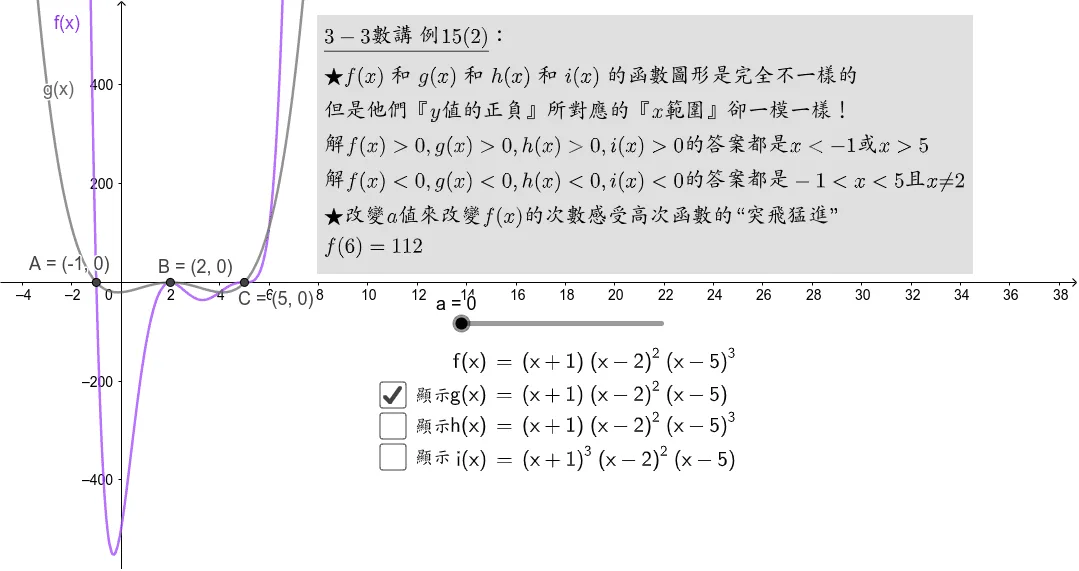
本范例展示了高次函数的图像及其相关性质。通过GeoGebra绘制高次函数曲线,并利用交点工具探究函数图像之间的交点坐标。结合LaTeX公式排版,直观呈现高次函数的解析式与几何特征,帮助学习者深入理解高次函数的图像变化规律及不等式的相关应用。
GeoGebra 画板及绘图内容加载中,请稍等……
<?xml version="1.0" encoding="utf-8"?>
<geogebra format="5.0" version="5.0.613.0" app="classic" platform="w" id="0737b818-7aa5-4b6f-ae36-02639f7b9bfb" xsi:noNamespaceSchemaLocation="http://www.geogebra.org/apps/xsd/ggb.xsd" xmlns="" xmlns:xsi="http://www.w3.org/2001/XMLSchema-instance" >
<gui>
<window width="1079" height="571" />
<perspectives>
<perspective id="tmp">
<panes>
<pane location="" divider="0.35032437442076" orientation="1" />
</panes>
<views>
<view id="4097" visible="false" inframe="false" stylebar="true" location="1,1,1,1" size="400" window="290,113,700,550" />
<view id="512" toolbar="0 | 1 501 5 19 , 67 | 2 15 45 18 , 7 37 | 514 3 9 , 13 44 , 47 | 16 | 551 550 11 , 20 22 21 23 , 55 56 57 , 12 | 69 | 510 511 , 512 513 | 533 531 , 534 532 , 522 523 , 537 536 , 535 | 521 520 | 36 , 38 49 560 | 571 30 29 570 31 33 | 17 | 540 40 41 42 , 27 28 35 , 6 , 502" visible="false" inframe="false" stylebar="false" location="1,1,1" size="500" window="100,100,600,400" />
<view id="4" toolbar="0 || 2020 , 2021 , 2022 , 66 || 2001 , 2003 , 2002 , 2004 , 2005 || 2040 , 2041 , 2042 , 2044 , 2043" visible="false" inframe="false" stylebar="false" location="1,1" size="300" window="100,100,600,400" />
<view id="8" toolbar="1001 | 1002 | 1003 || 1005 | 1004 || 1006 | 1007 | 1010 || 1008 1009 || 66 68 || 6" visible="false" inframe="false" stylebar="false" location="1,3" size="300" window="100,100,600,400" />
<view id="1" visible="true" inframe="false" stylebar="true" location="1" size="1077" window="100,100,600,400" />
<view id="2" visible="false" inframe="false" stylebar="false" location="3" size="378" tab="ALGEBRA" window="100,100,600,400" />
<view id="16" visible="false" inframe="false" stylebar="false" location="1" size="150" window="50,50,500,500" />
<view id="32" visible="false" inframe="false" stylebar="true" location="1" size="150" window="50,50,500,500" />
<view id="64" toolbar="0" visible="false" inframe="false" stylebar="true" location="1" size="150" window="50,50,500,500" />
<view id="128" visible="false" inframe="false" stylebar="false" location="1" size="480" window="50,50,500,500" />
<view id="70" toolbar="0 || 2020 || 2021 || 2022" visible="false" inframe="false" stylebar="true" location="1" size="150" window="50,50,500,500" />
</views>
<toolbar show="false" items="0 39 73 62 | 1 501 67 , 5 19 , 72 75 76 | 2 15 45 , 18 65 , 7 37 | 4 3 8 9 , 13 44 , 58 , 47 | 16 51 64 , 70 | 10 34 53 11 , 24 20 22 , 21 23 | 55 56 57 , 12 | 36 46 , 38 49 50 , 71 14 68 | 30 29 54 32 31 33 | 25 17 26 60 52 61 | 40 41 42 , 27 28 35 , 6" position="1" help="false" />
<input show="false" cmd="true" top="algebra" />
<dockBar show="false" east="false" />
</perspective>
</perspectives>
<labelingStyle val="2"/>
<font size="18"/>
</gui>
<euclidianView>
<viewNumber viewNo="1"/>
<size width="1077" height="569"/>
<coordSystem xZero="121.01281858666755" yZero="282.40395291450375" scale="24.690894758748748" yscale="0.4938178951749751"/>
<evSettings axes="true" grid="false" gridIsBold="false" pointCapturing="3" rightAngleStyle="1" checkboxSize="26" gridType="3"/>
<bgColor r="255" g="255" b="255"/>
<axesColor r="0" g="0" b="0"/>
<gridColor r="192" g="192" b="192"/>
<lineStyle axes="1" grid="0"/>
<axis id="0" show="true" label="" unitLabel="" tickStyle="1" showNumbers="true"/>
<axis id="1" show="true" label="" unitLabel="" tickStyle="1" showNumbers="true"/>
</euclidianView>
<kernel>
<continuous val="false"/>
<usePathAndRegionParameters val="true"/>
<decimals val="1"/>
<angleUnit val="degree"/>
<algebraStyle val="0" spreadsheet="0"/>
<coordStyle val="0"/>
</kernel>
<tableview min="-2" max="2" step="1"/>
<scripting blocked="false" disabled="false"/>
<construction title="" author="" date="">
<element type="numeric" label="a">
<value val="0"/>
<show object="true" label="true"/>
<objColor r="0" g="0" b="0" alpha="0.10000000149011612"/>
<layer val="0"/>
<labelOffset x="-14" y="2"/>
<labelMode val="1"/>
<slider min="0" max="100" absoluteScreenLocation="true" width="200" x="461" y="324" fixed="true" horizontal="true" showAlgebra="true"/>
<lineStyle thickness="10" type="0" typeHidden="1"/>
<animation step="10" speed="1" type="0" playing="false"/>
</element>
<expression label="f" exp="f(x) = (((x + 1)^(a + 1) * (x - 2)^(a + 2)) * (x - 5)^(a + 3))" />
<element type="function" label="f">
<show object="true" label="true" ev="4"/>
<objColor r="153" g="51" b="255" alpha="0"/>
<layer val="0"/>
<labelOffset x="-46" y="14"/>
<labelMode val="3"/>
<fixed val="true"/>
<lineStyle thickness="5" type="0" typeHidden="1" opacity="178"/>
<caption val="f(x)"/>
</element>
<expression label="g" exp="g(x) = (((x + 1) * (x - 2)^(2)) * (x - 5))" type="function"/>
<element type="function" label="g">
<show object="true" label="true" ev="4"/>
<condition showObject="b"/>
<objColor r="102" g="102" b="102" alpha="0"/>
<layer val="0"/>
<labelOffset x="-4" y="80"/>
<labelMode val="3"/>
<fixed val="true"/>
<lineStyle thickness="5" type="0" typeHidden="1" opacity="178"/>
<caption val="g(x)"/>
</element>
<command name="LaTeX">
<input a0="f" a1="true" a2="true"/>
<output a0="text1"/>
</command>
<element type="text" label="text1">
<show object="true" label="false" ev="8"/>
<objColor r="0" g="0" b="0" alpha="0"/>
<layer val="0"/>
<labelMode val="0"/>
<fixed val="true"/>
<isLaTeX val="true"/>
<font serif="false" sizeM="1" size="0" style="0"/>
<absoluteScreenLocation x="449" y="344"/>
</element>
<expression label="h" exp="h(x) = (((x + 1) * (x - 2)^(2)) * (x - 5)^(3))" type="function"/>
<element type="function" label="h">
<show object="true" label="true" ev="4"/>
<condition showObject="c"/>
<objColor r="0" g="100" b="0" alpha="0"/>
<layer val="0"/>
<labelOffset x="2" y="76"/>
<labelMode val="3"/>
<fixed val="true"/>
<lineStyle thickness="5" type="0" typeHidden="1" opacity="178"/>
<caption val="h(x)"/>
</element>
<expression label="i" exp="i(x) = (((x + 1)^(3) * (x - 2)^(2)) * (x - 5))" type="function"/>
<element type="function" label="i">
<show object="true" label="true" ev="4"/>
<condition showObject="d"/>
<objColor r="204" g="0" b="0" alpha="0"/>
<layer val="0"/>
<labelOffset x="-36" y="44"/>
<labelMode val="3"/>
<fixed val="true"/>
<lineStyle thickness="5" type="0" typeHidden="1" opacity="178"/>
<caption val="i(x)"/>
</element>
<command name="LaTeX">
<input a0="g" a1="true" a2="true"/>
<output a0="text2"/>
</command>
<element type="text" label="text2">
<show object="true" label="false" ev="8"/>
<objColor r="0" g="0" b="0" alpha="0"/>
<layer val="0"/>
<labelMode val="0"/>
<fixed val="true"/>
<isLaTeX val="true"/>
<font serif="false" sizeM="1" size="0" style="0"/>
<absoluteScreenLocation x="446" y="377"/>
</element>
<command name="LaTeX">
<input a0="h" a1="true" a2="true"/>
<output a0="text3"/>
</command>
<element type="text" label="text3">
<show object="true" label="false" ev="8"/>
<objColor r="0" g="0" b="0" alpha="0"/>
<layer val="0"/>
<labelMode val="0"/>
<fixed val="true"/>
<isLaTeX val="true"/>
<font serif="false" sizeM="1" size="0" style="0"/>
<absoluteScreenLocation x="446" y="408"/>
</element>
<command name="LaTeX">
<input a0="i" a1="true" a2="true"/>
<output a0="text4"/>
</command>
<element type="text" label="text4">
<show object="true" label="false" ev="8"/>
<objColor r="0" g="0" b="0" alpha="0"/>
<layer val="0"/>
<labelMode val="0"/>
<fixed val="true"/>
<isLaTeX val="true"/>
<font serif="false" sizeM="1" size="0" style="0"/>
<absoluteScreenLocation x="452" y="442"/>
</element>
<element type="boolean" label="b">
<value val="true"/>
<show object="true" label="true"/>
<objColor r="0" g="0" b="0" alpha="0"/>
<layer val="0"/>
<labelOffset x="375" y="377"/>
<labelMode val="0"/>
<checkbox fixed="true"/>
<caption val="顯示"/>
</element>
<element type="boolean" label="c">
<value val="false"/>
<show object="true" label="true"/>
<objColor r="0" g="0" b="0" alpha="0"/>
<layer val="0"/>
<labelOffset x="375" y="408"/>
<labelMode val="3"/>
<checkbox fixed="true"/>
<caption val="顯示"/>
</element>
<element type="boolean" label="d">
<value val="false"/>
<show object="true" label="true"/>
<objColor r="0" g="0" b="0" alpha="0"/>
<layer val="0"/>
<labelOffset x="375" y="439"/>
<labelMode val="0"/>
<checkbox fixed="true"/>
<caption val="顯示"/>
</element>
<command name="Intersect">
<input a0="g" a1="h" a2="1"/>
<output a0="A"/>
</command>
<element type="point" label="A">
<show object="true" label="true" ev="4"/>
<objColor r="68" g="68" b="68" alpha="0"/>
<layer val="0"/>
<labelOffset x="-71" y="-4"/>
<labelMode val="1"/>
<coords x="-1" y="0" z="1"/>
<pointSize val="4"/>
<pointStyle val="0"/>
</element>
<command name="Intersect">
<input a0="g" a1="h" a2="2"/>
<output a0="B"/>
</command>
<element type="point" label="B">
<show object="true" label="true" ev="4"/>
<objColor r="68" g="68" b="68" alpha="0"/>
<layer val="0"/>
<labelOffset x="-16" y="-1"/>
<labelMode val="1"/>
<coords x="2.000000000000048" y="-2.0702865596620234e-26" z="1"/>
<pointSize val="4"/>
<pointStyle val="0"/>
</element>
<command name="Intersect">
<input a0="g" a1="h" a2="4"/>
<output a0="C"/>
</command>
<element type="point" label="C">
<show object="true" label="true" ev="4"/>
<objColor r="68" g="68" b="68" alpha="0"/>
<layer val="0"/>
<labelOffset x="-10" y="31"/>
<labelMode val="1"/>
<coords x="5.000000000000046" y="2.4940050025180478e-12" z="1"/>
<pointSize val="4"/>
<pointStyle val="0"/>
</element>
<expression label="e" exp="f(6)" />
<element type="numeric" label="e">
<value val="112"/>
<symbolic val="true" />
<objColor r="0" g="0" b="0" alpha="0.10000000149011612"/>
</element>
<expression label="text5" exp=""\underline{3-3數講\;例15(2)}:\\
★f(x)\;和\;g(x)\;和\;h(x)\;和\;i(x)\;的函數圖形是完全不一樣的\\
但是他們『y值的正負』所對應的『x範圍』卻一模一樣!\\
解f(x)>0,g(x)>0,h(x)>0,i(x)>0的答案都是x<-1或x>5\\
解f(x)<0,g(x)<0,h(x)<0,i(x)<0的答案都是-1<x<5且x≠2\\
★改變a值來改變f(x)的次數感受高次函數的“突飛猛進”\\
f(6)=" + (LaTeX[e]) + """ />
<element type="text" label="text5">
<show object="true" label="false" ev="8"/>
<objColor r="0" g="0" b="0" alpha="0"/>
<bgColor r="224" g="224" b="224" alpha="255"/>
<layer val="0"/>
<labelMode val="0"/>
<fixed val="true"/>
<isLaTeX val="true"/>
<font serif="true" sizeM="1" size="0" style="0"/>
<absoluteScreenLocation x="320" y="18"/>
</element>
</construction>
</geogebra>